
All tab issues now resolved
We’ve had a few bugs related to data migration, tabs and sharing/importing of tabs. All of these issues should now be resolved. We have now made it impossible to lose widgets by preventing tab deletions unless they are empty. We have run a script so that any widgets from any accidentally deleted tabs should now be restored. Please let us know if you are still experiencing any issues via our contact form here.
By the way, you can drag widgets to different tabs. An arrow will appear above any tab that you drag a widget to, as illustrated in the screenshot.
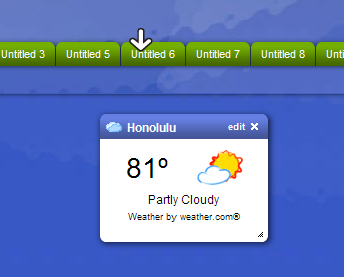
Also note that the default tab which will be selected when you load your Protopage will be the first tab in the first category in your Protopage. You can reorder tabs and categories simply by dragging and dropping them.

December 1st, 2006 at 4:56 am
Everything is working perfectly. Nice work guys.
December 1st, 2006 at 8:48 am
You guys restored the tabs for me which I had accidentally deleted and I am LOVING the new version of Protopage.
Kudos especially for Protopage’s revamped Feed Reader: now with Protopage I have all my favorite links and widgets together at the same place with all my favorite feeds, saving me time on the net.
The functionality of the Feed Reader (especially being able to choose just which elements appear in the preview) is simply awesome.
December 1st, 2006 at 3:55 pm
Question, is it possible to…have one todo list that is duplicated to multiple categories and if you make changes to this widget, the widget on all other pages will update? Reason is at work I am on linux using firefox v1.5 and some of the widgets, especially the digital and analog clocks, don’t work well so I wanted to have a work page and an at home page with mostly same widgets, but a few more that work at home on the home page. Sorry about the loonng sentences..hehe! I think that having this option of a widget to update across all pages would be very helpful just in general…thanks :-)
December 1st, 2006 at 5:22 pm
Can I just say I agree with Paolo. I use 1 main tab and then have about 5 other tabs broken out by subject. There is some information I would like to have on the main tab but synced up with the appropriate subject.
December 1st, 2006 at 6:40 pm
That’s a good idea in principle – if we can figure out a way to do it that people can immediately understand, we certainly will.
December 1st, 2006 at 11:36 pm
That would be great…to have a check box in a widget that can be checked to update all similar widgets on all tabs. Or just on option to save or save to all tabs when editing a widget…!!! :-)
December 2nd, 2006 at 4:50 am
Hi, I can’t find the “mark as read” button for the RSS feeds. Could someone help me find it? :)
December 2nd, 2006 at 5:39 am
Well the wait was worth it, thanks. At first the categories got me a bit confused so I decided to open a new protopage before trying to change my existing one.
One thing about the categories, I think it would be more useful and clearer to users if the top tab line of the page showed all tabs to the different categories. Sort of like a main menu. Clicking on one of those would take you to that category’s tabs.
Anyway thanks again
susan
December 2nd, 2006 at 5:21 pm
Excellent work guys, my faith in PP has been restored!! I’ve been away for a couple of days, so it was a nice surprise to return too.
If you can sort out the mark as read ‘feature’ that would be great
Steve
December 2nd, 2006 at 5:28 pm
About Protopage: I was caught off guard by the immense amount of changes in v3.0 – good work! It took me an hour to finish exploring all the new widgets and customization options!
One of my favorite features so far is the todo list widget. I have many textfile todo lists on my computer that I would like to migrate to the web, but I don’t want to hassle with them at a seperate page, and Protopage (since its tab is open at all times) would be the perfect choice. The only thing holding me back, however, is I would like to be able to backup/export the todo lists to a textfile locally, for printing or other applications. Currently with the styles applied to the todo lists, you can’t select the whole thing to copy+paste it, either, like at some sites.
Any ideas in this area?
December 2nd, 2006 at 6:56 pm
My podcasts don’t play on my work computer. They load up, but don’t start playing. (the same podcast plays fine at home, on a different computer). Could it be because I am behind a firewall and have to use a proxy? That wouldn’t make sense to me because it’s all in a browser page… right? Also, I’m using firefox 2.0 at work, firefox 1.5 at home, but that shouldn’t be it, right?
December 3rd, 2006 at 10:14 pm
I’m running OS 10.3.9 and am using Firefox 1.5,0,8 on an Imac G3 600 processor. In the earlier version of protopage I was able to write in the widgets and edit them in HTML and was quite happy but these new widgits don’t seem to be working properly for me. I can open a sticky note but when I try to edit all I seem to be able to do is change colors. Even though on the widget it states “Click and Start writing”when I try to do it nothing happens. I read all the positive comments about this new version but nothing is working for me and I am very disapointed because it had worked so well in the past. Anything i can do about this?
December 4th, 2006 at 9:15 am
Wow! Protopage is now wicked again, it took a few days, but not it’s awesome!
Just one niggle, I’m using ie6 at work and the settings changes (to get rid of the news reader – and the icons for bookmarks) don’t seem to have any effect, they work fine for firefox 2 at home.
December 4th, 2006 at 6:46 pm
Richard – thanks for letting us know. The ‘articles open in new windows’ setting will now work correctly in IE 6.
December 5th, 2006 at 9:07 pm
What\\\’s the trick to renaming your tabs to something other than untitle1, untitled 2, etc.? It\\\’s driving me crazy that I cant figure it out.
December 6th, 2006 at 8:12 am
Shazzer – just click the tab to select it, then click the text and you can edit it directly in place.
December 7th, 2006 at 9:32 am
Shazzer, don\\\\\\\\\\\\\\\’t feel alone. When v3 initially launched I couldn\\\\\\\\\\\\\\\’t figure it out either – was driving me crazy! I posted the question also and another user set me straight. It was so simple I guess I just couldn\\\\\\\\\\\\\\\’t figure it out…
December 18th, 2006 at 3:41 pm
How can I move a note widget from one page to another. The dock that I used to use is gone? BTW, I’m totally confused about the usage of all these categories. Is there a v3 tutorial?
December 18th, 2006 at 3:52 pm
Nevermind. I just noticed the white arrow when I drag the widget to the tab. Easy, peasy.
December 21st, 2006 at 10:13 am
You do not need to search for working free web proxies. All is here.
Find free web proxy for desired country!
All proxies are regulary checked if they still alive.
http://getproxy.emigrantas.com
enjoy it!
December 24th, 2006 at 8:13 pm
I have just started playing with protopage. I imported someone’s tabs to see how it worked. really I just wanted the widget feed of one of them. So Now I have all their tabs in my page. How do I get rid of them?
February 24th, 2007 at 6:02 pm
How do i delete tabs that I have imported from other people’s Proto Pages?? I cannot figure it out for the life of me??? This is very annoying. Please help.. Thanks!!
February 24th, 2007 at 6:05 pm
One more question… I was moving a widget around and then it just disappeared? Now I can’t find it anywhere?? Has this happened to anyone else?? I know for sure that I didn’t click the X and delete it… I hope it can be found or recovered.
Any advice??? Thanks!!
December 22nd, 2013 at 7:50 am
I like Protopage a lot and now it is set as my new homepage instead of ighome.
There are some minor things that you could improve like a better, nicer weather widget or more of them from which we could choose…
A Google Translate widget would be also nice…
The search bar is to big… A smaller search bar would be more elegant.
December 22nd, 2013 at 8:13 am
What weather widget is the one from the above photo?
How can I find that?