
Put a clock on your Protopage
UPDATE (17 May 2006) : Clocklink have modified the way their source code works, and are now using code that is incompatible with Protopage. We will post a message here when we have implemented a work-around.
As you’ve previously seen in our video tutorial, it’s possible to put all sorts of content into HTML sticky notes.
A website called ClockLink provides some fantastic clocks that you can use on your Protopage.
To get started, go to the ClockLink gallery and find a clock that you like.
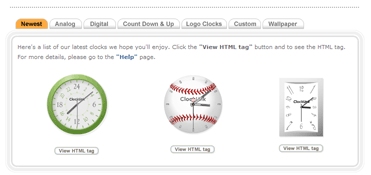
Once you have decided on a clock, click the View HTML Tag button underneath it.
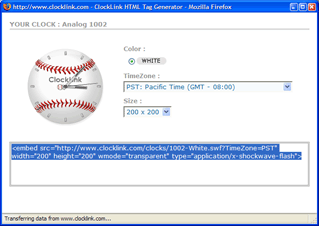
Choose your timezone and the size of the clock from the menus, and then copy the source code for that clock to the clipboard by selecting it, right clicking it and choosing Copy.
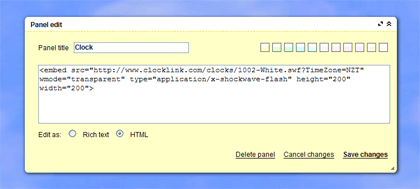
Now, go back to your Protopage, add a sticky note, and choose HTML at the bottom of the edit window. Now right click in the edit window and choose Paste.
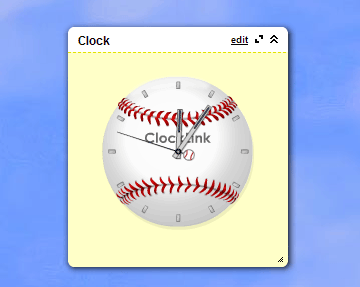
Click Save Changes and you’re all done!

February 23rd, 2006 at 12:43 am
P.S. If you want to make the clock even smaller than the Size setting at ClockLink allows, you can change the width= and height= values in the HTML code youself to smaller values.
February 23rd, 2006 at 12:00 pm
Nice (again!), but does it have to be a sticky note? Can’t you guys make it a widget? It would look way better without the panel-ish looks and background. Speaking of background, could you make it possible to choose more colors? I mean there is a handful of colors to choose from but how about custom colors? Or atleast add white to choice you give us :-))
February 23rd, 2006 at 12:36 pm
Hi works great. One thing I noticed was that I had to select html before I pasted in, rather than after. Which is per your instructions. I just thought it was curious!! Thanks so much for the new feature.
February 23rd, 2006 at 3:29 pm
I’ve used the clocklink clocks to create my own little “world time” window with my local time and that of my boss on the East US coast.
Another tool that I’ve added to my Protopage is information from my LAST-FM account.
February 23rd, 2006 at 4:28 pm
It would be great to have an option for sticky notes to auto-hide their title bars, scroll bars, and backgrounds when the mouse is not over them.
February 25th, 2006 at 6:31 am
Can we have a calendar widget? Or even a link to a place like this that would let us have current calendars show all the time in a sticky note window?
March 2nd, 2006 at 3:34 pm
Got the code embedded but it’s not displaying anything, just the outline of the bar (I chose a countdown clock).
March 3rd, 2006 at 2:02 pm
Great Stuff! Is there a calculator that can be embedded the same way?
March 13th, 2006 at 5:33 am
dude you guys totally jacked this idea from me! :) anywho it’s cool that you noticed and posted about it :)
March 13th, 2006 at 5:35 am
next you should jack my idea about using the XSPF player.. see my protopage for an example
April 8th, 2006 at 9:55 pm
Great article. I am just sad I dont know how to reply properly, though, since I want to show my appreciation like many other.
April 26th, 2006 at 4:38 am
I have tried to log on to my page, have had no success, tried forgot password, and recieved a E- mail that had a error report that made no sense to me, has enyone had a problem like this, I just want to change a couple of pics and add a link.
Rigar
April 26th, 2006 at 10:47 am
Hi Rick,
If you’re hoping to get help logging on to your page again, you’d best follow this link, and describe your problem there. Don’t forget to give the team your login name as well…
Although they keep following the comments on the blog, an email through the above system is much more likely to get their attention ASAP.
Hoping to have been of help,
FreeBee
May 24th, 2006 at 8:20 am
http://www.worldtimeserver.com do an alternative clock…..
April 16th, 2007 at 8:28 am
There a lot of flash clocks at clock-desktop.com
September 20th, 2007 at 10:49 am
good text thank you
December 24th, 2008 at 2:00 pm
thank you for article
December 24th, 2008 at 2:02 pm
thanks
February 16th, 2011 at 2:23 am
This is great! It really shows me where to expand my blog. I think that sometime in the future I might try to write a book to go along with my blog, but we will see.Good post with useful tips and ideas.
March 10th, 2011 at 1:37 pm
yurtdisi egitim, yurtdisinda egitim, yurtdisi egitimi, yurt disi egitim, dil okulu,
work and travel, yüksek lisans, yurtdisi üniversite, dil okullari, yaz okullari,
vize danismanlik, ankara yurtdisi eÄŸitim, ankarada yurtdisi eÄŸitim, istanbul yurtdisi
eÄŸitim, firmalari, yurtdisi eÄŸitim danismanligi firmalari
September 22nd, 2012 at 3:50 am
c4a3I think that when Galio is picked, it’s to enusre that you will have a solid standing vs. whatever the opposing teams middle may be. Kassadin and Morgana are very strong middle champions in middle lane and provide good presence vs other casters, but, Galio is good vs all those as well as anything else. I find when I play Galio, I AM the presence in the middle lane. I can provide excellent harassment as well as survivability. As long as your good with tossing a gaze down range, you should have no problem commanding your lane. The only problem I can foresee is if you come across a champion like Gragas, where he acts almost exactly as Galio. Both provide 2 pokes, a heal/damage reduction and a AOE ult with damage and placement (Almost a reverse ult).Speaking of this though, if you had the option I would pick a Gragas over a Galio simply because of a higher AP scaling and damage output late game, and Galio’s ult CD is kinda high with the high possibility of being interrupted right quick, as would frequent happen in games over 1500.Long story short, if your looking for this type of middle presence, pick Gragas.b4
September 22nd, 2012 at 6:33 am
kjAO1R ifamzsuoteqk