New stock quotes widget
October 4th, 2014We’ve just released a brand new stock quotes widget to replace the old Yahoo Finance widget.
Click the ‘edit’ button to enter your own list of stocks.


We’ve just released a brand new stock quotes widget to replace the old Yahoo Finance widget.
Click the ‘edit’ button to enter your own list of stocks.
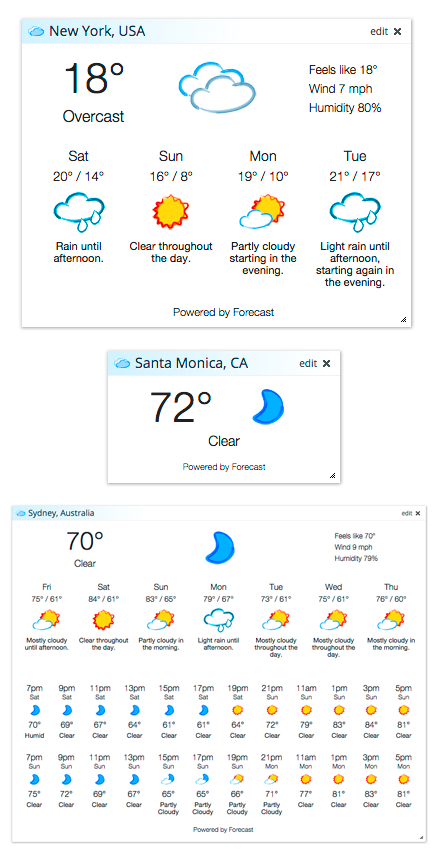
We’ve just released a brand new weather widget to replace the old Accuweather weather widget.
Be sure to click the ‘edit’ button on your weather widgets to try the new 4-day, 7-day and hourly forecast modes. Enjoy!
Have you ever wanted to mark all of the headlines inside a widget as read? You can now do this by holding the left mouse button down inside any widget and tapping the “X” key on your keyboard.
If you want to mark all widgets on your page as read, you can hold the left mouse button down in the empty space between two widgets, and tap the “X” key. Every widget on the current tab in your Protopage will be marked as read.
Please note it is important that you keep the mouse button held down while you are tapping the “X” key for this to work. This mark-as-read feature applies to both News Feed widgets and to Twitter widgets.
If you need to reverse this and un-mark any items as read, you can do this for a particular widget or for the entire page by tapping the “S” key instead of the “X” key. Enjoy!

By popular demand, we’ve added some new display options for your news headlines.
To access these options, click the Colors/Settings button at the top of your page, and look in the bottom left of that screen.
You can now “line wrap” your headlines, so that the whole headline will show even if it’s too long to fit inside the widget.
When you click a headline, normally it will turn gray and there will be a line through it. We now have the additional options of either hiding it completely, or leaving it unchanged.
Finally, we now have a specific option to change the size of all news headlines on your page (this setting also applies to twitter headlines and email inbox widget items).
If you have a browser that supports Ctrl/Cmd +/- to change the size of web pages, you may also find that a useful way to change the size of text on your Protopage (i.e. you hold down the Ctrl key and tap the + or – key on your keyboard. On Macs, hold down Cmd instead of Ctrl).

Welcome to those of you that are migrating from iGoogle to Protopage this month. For those of you that are not aware, iGoogle is a Google competitor to Protopage that is being shut down by Google in a few week’s time.
We’re very proud to have outlasted our competitors, and have been able to do so because we have not relied on outside investors or venture capitalists to fund our operations.
We built Protopage to meet our own needs and desires for a start page, and we continue to work on the site to add and update features so that Protopage will be here for the long run.
We are a small independent company, and are unique in that we do not rely on the mercy of a large internet company in order to justify our existence.
Thank you to all of our loyal users. As we said when we launched Protopage 8 years ago, we are in this for the long term and we plan to see Protopage around for many decades to come!
We’ve just released a new version of Protopage featuring a new lightweight design that will speed up your page load by 20-40%. We’ve also added a new search bar, which will make it easier for you to access all of your favourite search engines. We’ve also released a new Twitter timeline widget that will display your home timeline from your Twitter account. (This is in addition to the existing Twitter profile and search widgets).
By popular demand, we’ve made it easier to manage your bookmarks. You can now drag bookmarks between widgets, or even drag them within a widget to reorder them.
To drag a bookmark, ensure that you drag it by the bookmark icon.

As before, you can still click the ‘edit’ button on a bookmarks widget to edit your bookmarks in list mode.
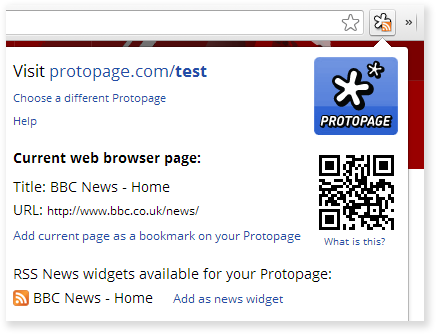
We’ve just released an extension for the Google Chrome web browser that makes it easy to add bookmarks and news feeds to your Protopage.
Simply click the icon and the extension will show you if the news site or blog you are currently visiting can be added to Protopage as a news feed. It’s also an easy way to add bookmarks to your Protopage.
To install this Chrome extension, click here
We’re also working on a Firefox extension for future release.
Due to popular demand, we’ve just released a new version of Protopage with a flurry of new features:
You can now see the weather in any city in the world, add your own stock quotes and charts, and add your personal Google Calendar with these new widgets. They are available on the list inside the “Add widgets” menu.

We’ve slightly tweaked the color gradients used when widgets are displayed on the screen. This is so that they look better with a much wider range of color selections than before.

We now support the latest version of Safari and iOS 6 for iPad and iPod touch. If you are using a tablet and you find yourself accidentally dragging widgets around when you only intended to scroll, there is now also an option to disable widget dragging on tablets.
We’ve created 50 new original wallpapers that are available via the Colors/Settings screen

Thanks to everyone that has written in with suggestions and bug reports. Please keep the feedback coming!
Google announced today that it is shutting down iGoogle, which was a Protopage competitor.
Protopage launched in 2005 and is still going despite nearly every other start page shutting down or becoming derelict.
We were one of TechCrunch’s first ever posts on August 18th 2005 (after seeing we were the #1 most bookmarked site on delicious that weekend), and we’re still going strong!
http://techcrunch.com/2005/08/18/profile-protopage/
FYI, unlike other start pages that took huge amounts of venture capital and underwent forced sales, Protopage is completely independent and debt free, and we hope to be around to celebrate our 50th birthday one day if the internet is still around…
(If you’ve just discovered Protopage, you can try it here)
